
How to Set Up and Use Proxifier — Proxy Settings for Any Software
Published
Jun 24th, 2026
Topic
Manual
Reading time
10 mins


Author
StableProxy
Proxifier — How to Configure and Use the Program with Proxy Servers
If you need to route the internet traffic of a specific application through a proxy server, Proxifier is one of the most convenient tools out there. It's especially useful when the app doesn’t support proxy settings by default. This includes browsers, email clients, games, scrapers, or any software that needs access to the internet through a custom IP address.
In this guide, we’ll walk you through how to configure Proxifier, connect your proxy, and start using the program in real scenarios. Whether you're working with private, mobile, or datacenter proxies — Proxifier proxy setup only takes a few minutes.
Proxifier gives you full control over your connections: you can set custom rules for different apps, use multiple proxies simultaneously, monitor traffic, and log all activity. This becomes especially useful when using a proxy for software that handles sensitive data or requires a stable IP address.
A common question is: how to use Proxifier day to day? The answer is simple — once it's configured, it just works in the background. Your traffic is redirected automatically. And thanks to its intuitive interface and powerful rule system, you can adapt it to almost any workflow.
Once the Proxifier installation is complete, open the program and follow these easy steps:
- Click on "Proxy Servers" in the interface.
- Select "Add".
- Apply the proxy server settings using the data in your control panel.
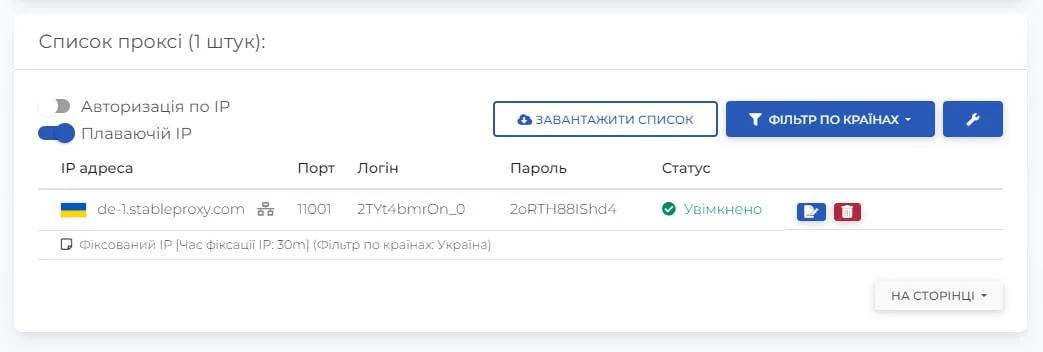
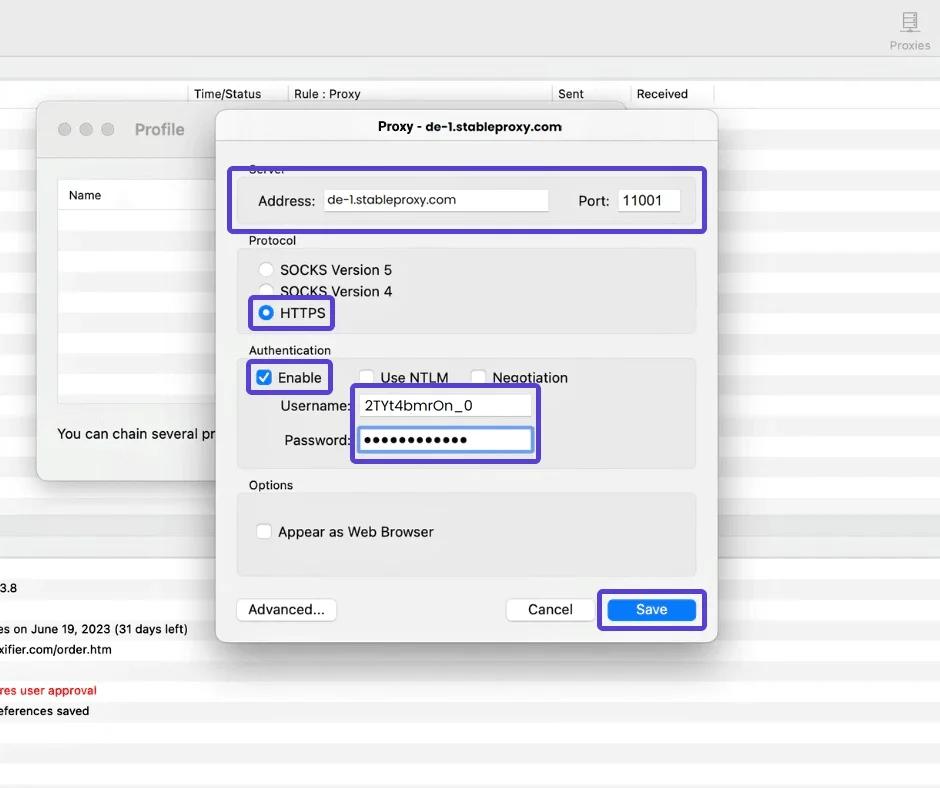
- After pressing OK, a dialog box will appear asking whether you want to set this proxy as the main one for all programs. If you want to apply the proxy only for selected programs, simply select "No".

Set up proxy settings for specific programs:
- Click on "Rules" in the Proxifier interface.
- Select "Add" to create a new rule.
- In the "Programs" field, enter the names of the programs you want to associate with your proxy servers.
- In the "Action" section, select the appropriate proxy server.
- Click OK to save the settings.
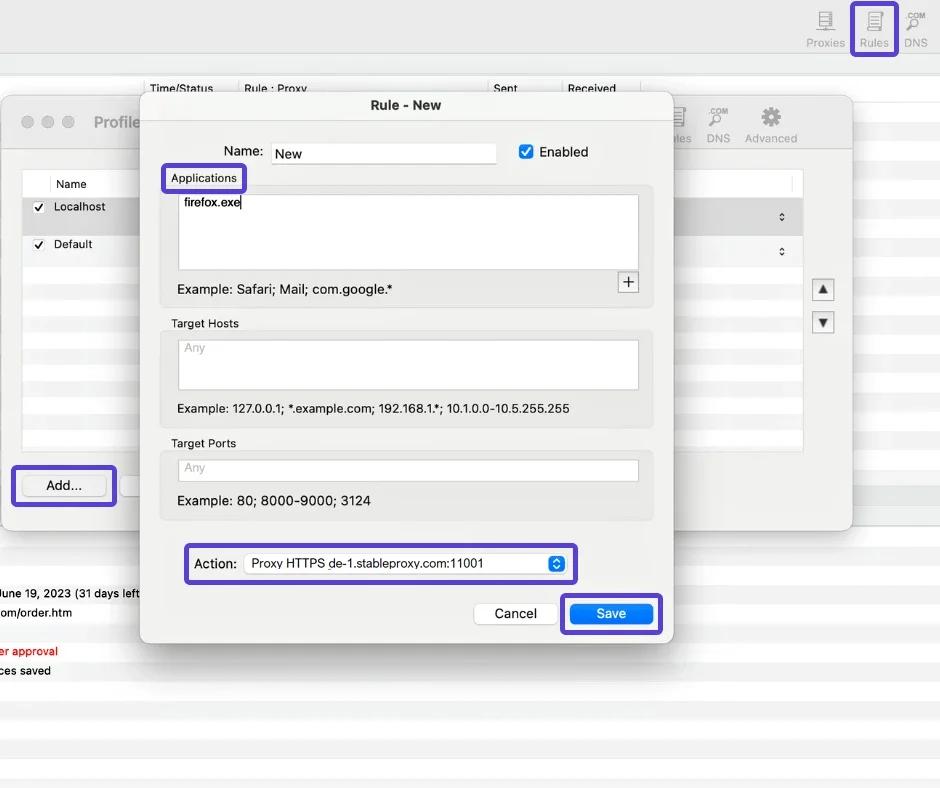
That's all it takes! By following these simple instructions, you can easily set up proxy servers for specific programs, adapting their functioning to your individual needs. Enjoy personalized internet browsing with ease.
Proxy Servers Under Control: What You Gain by Using Proxifier
Setting up Proxifier is quick and easy. It gives you the flexibility to manage proxy traffic across any application. Whether you're trying to route a non-proxy-aware program or just want more privacy and control — Proxifier is the right tool.
Give it a try — set up Proxifier once, and you’ll see how effortless it is to use it every day. No more complicated proxy configurations — just the right IPs, simple setup, and a stable connection.


StableProxy.pl © 2023-2024